Why You're Probably Shooting (and Stitching) Panoramas Wrong in Lightroom

Why You're Probably Shooting (and Stitching) Panoramas Wrong in Lightroom

There’s a particular kind of pain that comes from getting home after a long shoot, opening Lightroom, selecting your pano sequence, hitting Merge, and watching the result come out warped, misaligned, or with exposure banding across the frame. I’ve been there more times than I’d like to admit. The frustrating part is that the problem almost always started on location, not in the software. That’s why this tutorial from Mark Denney caught my attention immediately.

Why Your Colors Look Flat After Editing (And the HSL Fix Nobody Talks About)

Why Your Colors Look Flat After Editing (And the HSL Fix Nobody Talks About)

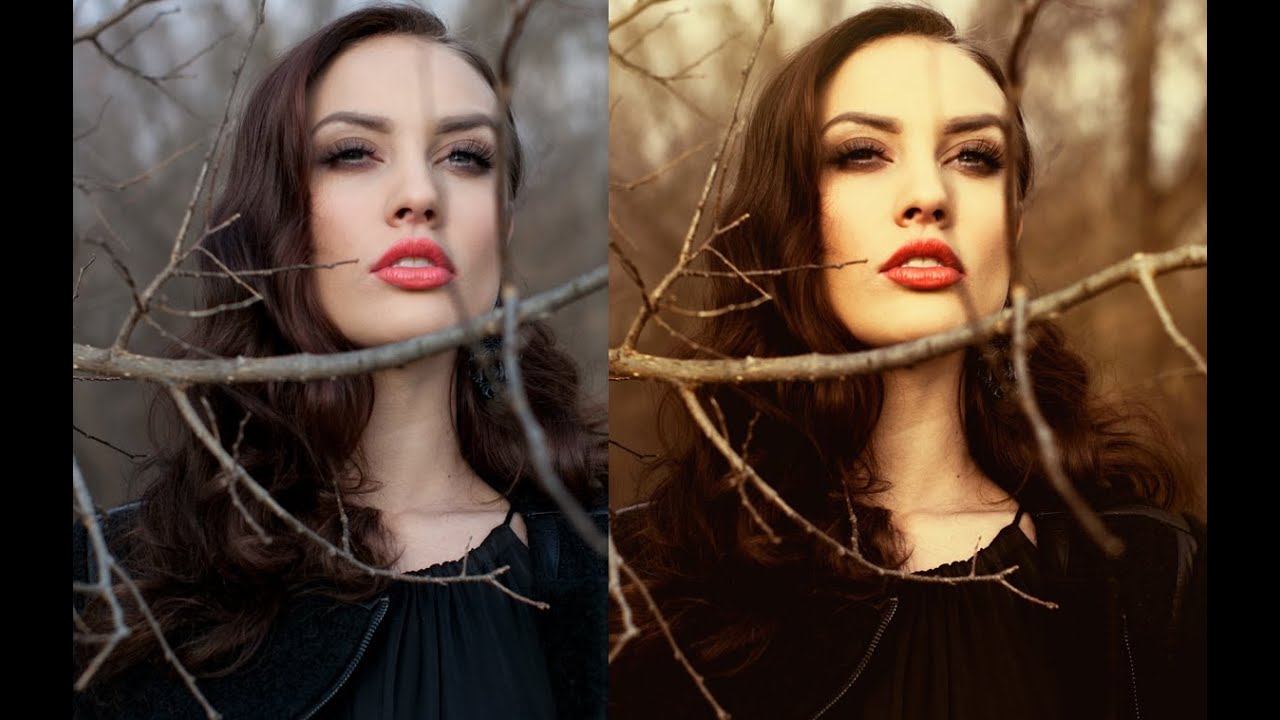
I was editing a portrait session last spring when I realized the skin tones looked like someone had smeared a thin coat of caramel over a gray wall. The colors were technically correct. White balance was dialed in. Exposure was clean. But something about the image felt defeated, like it was trying its best and still coming up short. The problem wasn’t the exposure. It wasn’t the white balance. It was the hue shift that happens when you push saturation without touching luminance.

Lightroom Tips I Wish I'd Known in Year One (Peter McKinnon's 10-Tip Breakdown)

Lightroom Tips I Wish I'd Known in Year One (Peter McKinnon's 10-Tip Breakdown)

There’s a specific kind of frustration that comes from using a tool every day and slowly realizing you’ve been ignoring half of it. I came to Lightroom the hard way. Our band needed press shots, nobody wanted to pay a photographer, and I ended up being the guy who figured out post-processing by necessity. For years, I was dragging sliders around with no system, no shortcuts, and no real understanding of what the software could actually do.

Three Photos, No Rules: What Matt Kloskowski's Editing Process Actually Teaches You

Three Photos, No Rules: What Matt Kloskowski's Editing Process Actually Teaches You

Every few months I’ll watch another working photographer edit in real time, not because I need the basics refreshed, but because the decisions are where the education lives. Anyone can list sliders. Watching someone decide which slider matters, and why, is a different thing entirely. That’s what pulled me into Matt Kloskowski’s new Photo Makeover series. Watch the full tutorial on YouTube and you’ll see what I mean within the first two minutes.

LUTs Explained: How to Color Grade Your Videos the Peter McKinnon Way

LUTs Explained: How to Color Grade Your Videos the Peter McKinnon Way

Every editor I know has a folder somewhere called something like “finals_FINAL_v3” and inside it, footage that looks technically fine but emotionally flat. Sharp, exposed correctly, maybe even well-composed. And yet it feels like a screenshot instead of a frame. That gap between “recorded” and “cinematic” is exactly what LUTs are designed to close, and it’s something I think about constantly, even though my main home is in Lightroom editing stills.

White Snow, Warm Mess: 7 Lightroom Fixes That Actually Work on Winter Photos

White Snow, Warm Mess: 7 Lightroom Fixes That Actually Work on Winter Photos

Every January I open a folder of winter shots and think the same thing: why does my snow look like a gas station slushie? Sometimes it’s blue from a clear sky acting as a giant overhead reflector. Sometimes it’s that flat, greenish-gray you get from overcast light. Either way, the camera captured it faithfully and Lightroom handed me a problem to solve. Winter editing isn’t hard in the way that, say, compositing is hard.

How to Merge HDR Photos in Lightroom (Without Making It Look Like a Nightmare)

How to Merge HDR Photos in Lightroom (Without Making It Look Like a Nightmare)

There’s a specific kind of frustration that hits when you’re standing in front of a stunning landscape, you nail the composition, you fire the shutter, and then you open the file later and half the image is either blown out or buried in shadow. Your eyes handled the scene beautifully. Your camera did not. This is the dynamic range problem, and it’s one of the most common reasons a photo that felt incredible in the field ends up looking flat or broken on screen.

From Flat RAW to Film-Style Masterpiece: Using Lightroom and Photoshop Together the Right Way

From Flat RAW to Film-Style Masterpiece: Using Lightroom and Photoshop Together the Right Way

Every time I open a fresh RAW file, I’m reminded of the same uncomfortable truth: the camera lies. Not in a dramatic way, but in a flat, uninspiring, “did I even take this correctly?” kind of way. RAW files are intentionally unprocessed, and that blank-slate quality is either your best friend or your worst enemy depending on whether you have a clear workflow to get from capture to finished image. For years, I treated Lightroom and Photoshop as two separate tools I’d open at different times for different jobs.

The Alt/Option Key Tricks in Lightroom That Changed How I Edit Every Photo

The Alt/Option Key Tricks in Lightroom That Changed How I Edit Every Photo

There’s a specific kind of frustration that comes from spending twenty minutes dialing in the tone of a photo, getting the shadows exactly right, nailing the contrast, and then realizing you also need to reset just the clarity and texture sliders because you went a little heavy-handed. The Reset button in Lightroom wipes everything. You’re starting over. For a long time, I was clicking through my History panel like it was a time machine, trying to claw back a specific moment in the edit.

How to Fix Converging Verticals in Lightroom Using Guided Upright (And Actually Control the Result)

How to Fix Converging Verticals in Lightroom Using Guided Upright (And Actually Control the Result)

Shooting architecture while traveling is one of those things that looks easy until you get home and open Lightroom. You tilted the camera up to fit the building in the frame, and now every vertical line is falling inward like the walls are slowly closing in. The automatic Upright options in Lens Corrections do an okay job, but they’ve always felt like a negotiation you’re losing. Lightroom picks the reference points, and you just hope it chose wisely.

Bridge Meets Lightroom: What Actually Happens When Your Workflows Collide

Bridge Meets Lightroom: What Actually Happens When Your Workflows Collide

There’s a particular kind of panic that hits when you realize you’ve been editing photos in two different programs and you have no idea which one is “winning.” I’ve been there. You’re browsing a folder in Adobe Bridge, you make a quick tweak in Camera Raw, and then you open Lightroom and stare at the screen wondering why nothing looks right. It’s not a fun place to be, especially mid-deadline.

Lightroom Presets Are Not Magic Buttons (But Here's How to Make Them Feel Like It)

Lightroom Presets Are Not Magic Buttons (But Here's How to Make Them Feel Like It)

A few years back, I released a preset pack on a Tuesday night mostly because I couldn’t sleep. I’d spent the better part of a weekend building it, named every preset after a Wilco song, and figured maybe a hundred people would download it. By Friday it had 50,000 downloads. By the following Monday, my inbox was a disaster of people saying the presets “didn’t work” on their photos. That week taught me more about Lightroom presets than the previous three years of using them.